 Sanjog
How to make a matrimony profile for your son or daughter
In most Indian families the search for a rishta starts with a parent. If you are looking for a bride for your son or a groom for your daughter, a clear, honest matrimony profile does most of the work for you. Here is how to make one, step by step, on Sanjog, and what to write so the right families reply.
Before you start
Keep these ready. It takes about fifteen minutes with them, and much longer without.
- Two or three recent photos: one clear face photo, one with family, one doing something they enjoy.
- Education and work details: highest degree, college, current job and city.
- Family details: parents' occupations, siblings, where the family is from.
- Date, time and place of birth, if your family matches kundlis.
Make the profile, step by step
- Talk to your son or daughter first. Agree together what the profile will say and which photos to use. A profile made with their agreement reads better, and the first conversation goes more smoothly when they already know what it says.
- Sign in and choose who the profile is for. Install Sanjog from Google Play or open it on the web. Sign in with your mobile number or email and a one-time code. On Who is this profile for? pick My Son or My Daughter.
- Fill in the basics. Full name, gender, date of birth, the city they live in, height, marital status, and faith and community. Families filter on these first, so fill them in completely.
- Add education, career and family. The highest education, the work history and years of experience, then Tell us about your family: parents, siblings and family background.
- Write the about section. This is the part most profiles get wrong. See what to write below.
- Add kundli and birth details. Your son's or daughter's birthday is already filled in; add the birth time and place of birth. When the other side has shared theirs too, Sanjog shows the guna score for the two profiles. You can upload an existing kundli instead, or tap Maybe later.
- Add photos and invite the family. Add a clear main photo and up to three more. Then open Family access and invite the other parent, a sibling, or your son or daughter themselves.
New profiles are reviewed before other families can see them, so there can be a short wait before the profile appears in search.
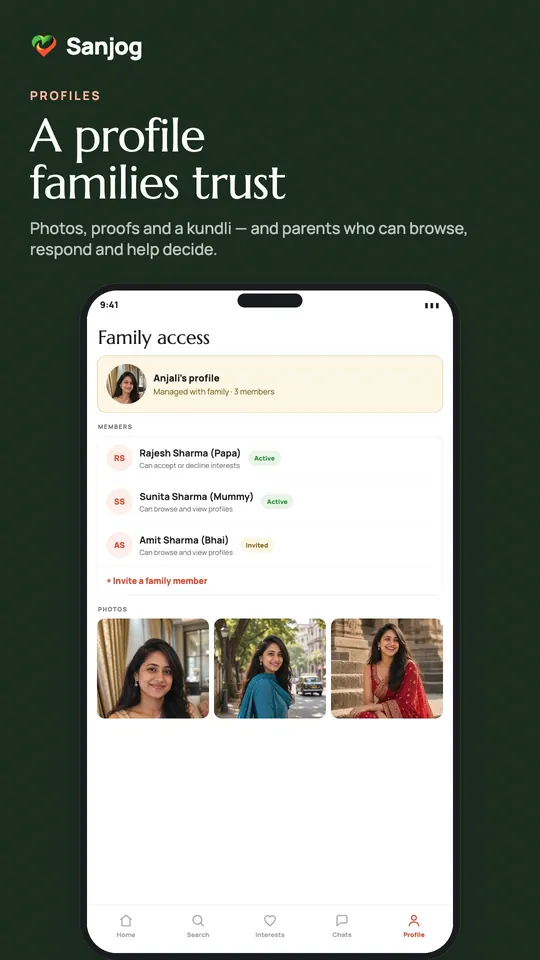
Choose who in the family can do what
When several people help with one search, decide early who replies to interests. Sanjog gives each invited family member one of three roles, and you can change or remove access at any time.
| Role | What they can do | Good for |
|---|---|---|
| View only | Browse matches and view profiles | Grandparents, an uncle or aunt who wants to look |
| View & respond | Accept interests and chat on behalf of the profile | The parent who handles replies |
| Full manager | Edit the profile, invite family and chat | Your son or daughter, or the other parent |
What to write in the about section
Families read the about section to picture the person, not to check a list. Three or four honest sentences beat a long biodata.
- Write about them, specifically. "She teaches maths at a school in Bhubaneswar and spends Sundays at her grandmother's" says more than "simple, caring, family-oriented".
- Say what kind of partner and family you hope for. Values, city or relocation, whether both work, how close you live with family.
- Be honest about the details that matter. Marital status, diet, and whether you match kundlis. Surprises later cost everyone time.
- Write it in their voice, or say who is writing. "I am writing this for my son…" is perfectly fine. Families respect it.
Photos that help
A clear, recent, smiling face photo in good daylight as the main photo; no sunglasses, no group shot as the first picture. The main photo is visible to other members. If you turn on photo privacy, the other photos and the video introduction open only after an interest is accepted.
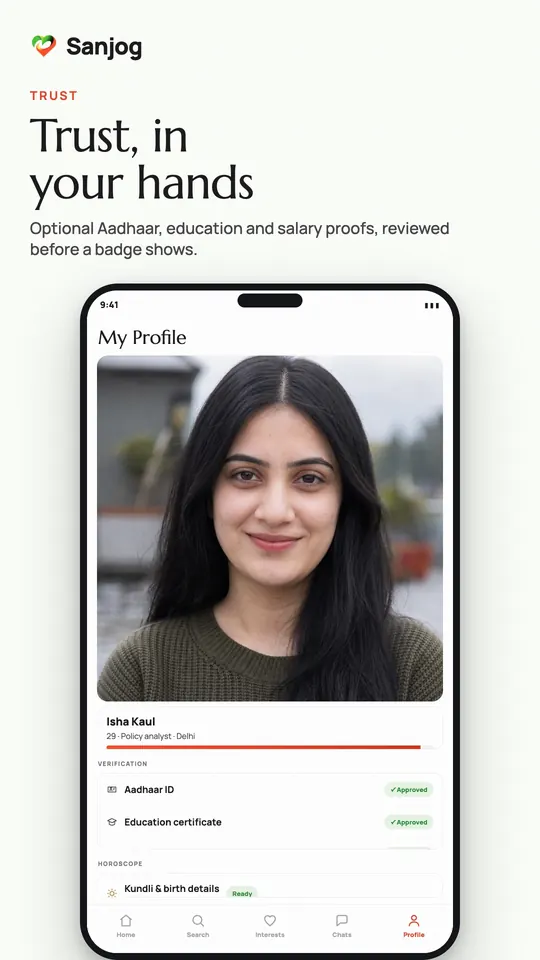
After the profile is live
- Search by community, age, city and education, and send interests to profiles your family likes.
- Chat opens only after both sides accept an interest, so nobody can message your son or daughter before that.
- Optional proofs (Aadhaar ID, education certificate, salary proof) can be added later; a badge shows only once a proof is approved.
- Reply to interests within a day or two. Families notice, and a quick no is kinder than silence.
Only with their consent. Sanjog is for adults aged 18 and over. Make a profile for your son or daughter only with their agreement, and let them see what it says.